Tuesday, 7 February 2017

INTRODUCTION TO ANGULARJS

In this Article, we explored step by step guides for beginners, so that they can get complete required help from one single channel. Since AngularJS is a very rich framework so I decided to write in a series of post that will help beginners who want to learn or work on SPA(Single Page Application) using AngularJS. I am assuming that people reading this article are aware of html and javascript/jquery. So lets start with a short but detailed AngularJS Course content where you will be able to quickly understand the power of AngularJS in the world of web.

Click Here To know more about the Complete AngularJS Topis.

Background


You may have heard people talking about MVC/MVVM/MV*/ MVW (Model View Whatever) or have ever worked with, in some other programming languages. Though MV*/MVW is not a concept specific to AngularJS, but rather an approach to program architecture which is implemented in variety of programming languages and environments. It depends on the architect to architect that how he wants the architecture of the software and AngularJS provides facilty to design application in Model View and Whatever you want to have(lets say mvc,mvvm etc..).  There are bunch of topics to cover which we will be looking into one by one in the later part of tutorial, but still I will try to make you familiar with atleast some of the terminologies that I have used here in this part of tutorial.

So first lets try to understand MV* concept relative to AngularJS.

Views


View in an application actually is a part which is rendered in a browser through which user can interact or see whatever data has been requested. In an AngularJS application view is composed of directives, filters and data-bindings. But to make view simple and maintainable we do not put all of our code into the View. This helps us to separate code from view and also makes it easy to write tests for the business logic.

Controller


Controller holds all of our application logic in AngularJS. The Controller controls and prepares the data into the form so that it can be rendered at the View. Functionally what controller actually does is, it collects all of data into the representational form and also takes from view and set into the Model after validating it. The controller is responsible for communicating the server code to fetch the data from a server using Ajax requests and send the data to back-end server from Views.

Model / View Model / $Scope


The most important and head part of the MV* architecture is Model or View Model or $Scope.  $Scope is a term which is introduced in AngularJS and we will discuss more on this in the later part of the article. Model is the bridge standing between Controllers and Views . There can be a controller which we can bind to two or more views. Lets suppose we have a controller assigned for a registration of users, for this purpose you can have a different view for desktop and another view for mobile.


In reality the Controller is blank about views and has no information about the views and similarly View is independent of logic implemented or data present in the Controller. $scope acts as the communication tunnel between the Views and Controller.


Picture above is actually related to the sample application that we are going to create in the later part of the article. But for now from this picture atleast you can get an idea to MV* pattern.

What Exactly AngularJS Is?


In my terms AngularJS is nothing different to plain HTML but simply an extension to HTML with new attributes. AngularJS is a JavaScript MV* or MVW structured framework for dynamic web applications. It is maintained by Google to allow you to develop well architectured and easily maintainable web-applications. AngularJS makes use of declarative programming for building UI. AngularJS is client-sided so all these things are happening in browsers and you get the elegance of standalone application. 

Why To Use AngularJS?


There are a lot many front-end frameworks available in the web world like Backbone, Knockout, Ember, Spline etc. and all of them have some pros and cons. But as the tutorial is all about AngularJS so the question arises that What is so peculiar about AngularJS ? So here is the answer to all your question.

With AngularJS you need to write lesser code as it allows you to reuse components. Also, it provides an easy way of two-way bindings and dependency injection (we will discuss more on next part of the tutorials). As AngularJS is client-sided so all these things are happening in browsers, which gives you feel of standalone applications(Desktop application).

Some of the reasons why I would prefer AngularJS or rather I say why AngularJS has become choice for the modern application architectures are described below:

1) You can create a template and reuse it in application multiple times.

2) You can bind data to any element in two ways, where two-way actually means changing data will automatically change element and changing element will change the data.

3) You can directly call the code-behind code in your html.

4) You can validate forms and input fields before submitting it without writing a single line of code.

5) Allows you to control complete dom structure show/hide, changing everything with AngularJS properties.

6) AngularJS allows you to write basic flow end-to-end testing, unit-testing, ui mocks.

In short, AngularJS provides all the features you need to build a CRUD application like data-binding, data validation, url routing, reusable HTML components and most importantly dependency injection.

Using the code


Lets start with a plain html which has nothing to do with AngularJS. First of all create a html page lets sayPart1.html and add a Div with someID.

<html>
  <head>
  <title>AngularJS Tutorial</title>
  </head>
  <body>
    <div id='content'>
    </div>
  </body>
</html>

Now, move ahead and lets try to get familiar with AngularJS terminologies that I will be using in this part of the tutorial. Let us now modify our html page and add AngularJS reference to the html page which you can either download from here or use as a script reference on your head section of the page. In this sample application I have downloaded the file and referred from a physical location. Also we will add some directives more specific to AngularJS.

Directives are nothing but HTML tags and attributes (we will see more on this in the next part of the article). AngularJS provides numerous built-in directives like ng-app, ng-controller, ng-class, ng-repeat and many more. You can also create custom directives which we will learn in the next part of tutorial. Here is complete API reference available for AngularJS, you can search and get information about all directives or you can download Angular Cheat Sheet.

<html>
  <head>
  <title>AngularJS Tutorial</title>
    <script src="angular.min.js"></script>
  </head>
  <body>
    <div id='content' ng-app='MyApp' ng-controller='MyController'>
      <h1> {{ article}}!</h1>
    </div>
  </body>
</html>

In the above code I have used some directives ng-app, ng-controller and a delimiter {{ }} so that AngularJS can evaluate the expression. Now the question comes in mind that what exaclty ng-app and ng-controller is and what importance does it have in an AngularJS application?

The ng-app is important of all directives in AngularJS. It actually defines the scope of your application that AngularJS can understand and it can be used either on the html tag itself or with the div tag if you want it to define its scope to the extent of a div. I wanted to scope it to the div section only, that is why I have set ng-app attribute to div. You can set it on the html tag if you want. Though it is not mandatory to provide a value to ng-app but you can put it blank only if you do not have any controller or model/view model/$scope. The sample application described here has a controller named "MyController" and I want to use data from controller so we need to provide the value for ng-app and here I have set it to "MyApp".

Another attribute or I should say directive which is defined here is ng-controller. The ng-controller directive attaches a controller class to the view. It tells AngularJS that the controller for the DOM element has the name "MyController" and children DOM elements will have the same controller for them unless explicitly a new controller is specified for them using ng-controller.  In this application we have a controller named "MyController" which is attached to ng-app="MyApp".

And here comes the third thing {{ }} which we have never seen before in plain HTML or javascript/jQuery. {{ }} is AngularJS default delimiter for expression boundaries. It has to be used carefully in directives and HTML attributes and the reason is how AngularJS internally handles expressions. 

Lets proceed with the remaining part of the sample application and see what has to be done next. I have created a file named "app.js" and it has below code:

var app = angular.module('MyApp',[]);

You  can see here something angular.module. Module is like a container for different parts of your app like controllers, services, filters, directives, etc. Using modules you can divide your app into multiple parts which can work independently. Here we have assigned the module to a variable "app" which will contain our controller within it.

And now create another file named "mycontroller.js" which has below code:

app.controller("MyController", function($scope)
    {
 $scope.article = "Hello there!!I am learning AngularJS";    
});

We have a new term here "$scope". Scope holds the Model data that we need to pass to the view.  It uses AngularJS two-way data binding mechanism to bind model data to view.

So finally your html page should look like this.

<html>
  <head>
  <title>AngularJS Tutorial</title>
    <script src="angular.min.js"></script>
    <script src="app.js" type="text/javascript"></script>
    <script src="mycontroller.js" type="text/javascript"></script>
  </head>
  <body>
    <div id='content' ng-app='MyApp' ng-controller='MyController'>
      <h1> {{ article }}!</h1>
    </div>
  </body>
</html>

When you open Part1.html in the browser.
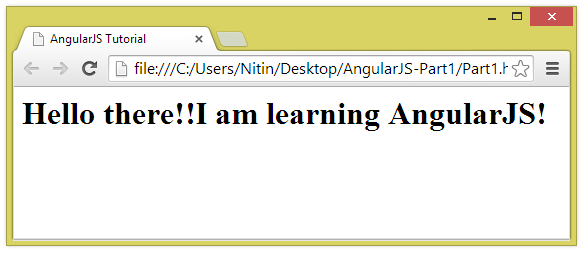

That's it!! You are now AngularJS Developer!!
Here are the complete collections AngularJS key features.

Friday, 27 January 2017

ANGULARJS INTERVIEW QUESTIONS - Set 4


31. Does Angular use the jQuery library?


YES, Angular can use jQuery if it’s present in your app when the application is being bootstrapped. If jQuery is not present in your script path, Angular falls back to its own implementation of the subset of jQuery that we call jQLite.

32. Why AngularJS?


AngularJS lets you extend HTML vocabulary for your application. The resulting environment is extraordinarily expressive, readable, and quick to develop.
MVC implementation is done right.
It extends HTML using directives, expression and data binding techniques to define a powerful HTML template.
Two way data-binding, form validations, routing supports, inbuilt services.
REST friendly.
Dependency injection support.
It helps you to structure and test your JavaScript code.

33. What are the key features/concepts of Angular.js?


When you start learning AngularJS, you will come across following terms and these are the features/concept of AngularJS.
Scope
Directives
Expression
Filters
Data Bindings
Model
View
Controller
Modules
Services
Dependency Injection

Here you can find more topics about the AngularJS Concepts.

34. Is AngularJS is compatible with all modern browsers?

 YES. AngularJS team run extensive test suite against the following browsers: Safari, Chrome, Firefox, Opera 15, IE9 and mobile browsers (Android, Chrome Mobile, iOS Safari).

35.What is the basic need to start with AngularJS?


To start with AngularJS, one need to make reference of angular.js. The latest version of AngularJS can be downloaded from AngularJS.com. You can either download the required js file and then host them locally or you can also use google CDN for referencing it. Here is the link for google CDN url for referencing AngularJS.

36. How does the AngularJS framework initialize itself?


The AngularJS has a self-executing anonymous function present in angular.js code, which does the initialization of AngularJS.
Here is how below it looks:
(function(window, document, undefined) {
<!--
here goes entire AngularJS code
including functions, services, providers etc related code goes here
-->
if (window.angular.bootstrap) {
    //AngularJS is already loaded, so we can return here...
    console.log('WARNING: Tried to load angular more than once.');
    return;
  }
 
  //try to bind to jquery now so that one can write angular.element().read()
  //but we will rebind on bootstrap again.
  bindJQuery();
 
  publishExternalAPI(angular);
 
  jqLite(document).ready(function() {
    angularInit(document, bootstrap);
  });
 
})(window, document);
Above function first check if Angular has already been setup. If it has, we return here to prevent Angular from trying to initialize itself a second time. And then it binds jQuery (if present) and publish external API. And finally angularInit() method does the trick for initialization of AngularJS.

37. What is the bootstrapping in AngularJS?


Bootstrapping in AngularJS is nothing but just initializing, or starting, your Angular app. AngularJS supports automatic bootstrapping as well as manual way as well.

 38. What are templates in AngularJS?


In Angular, templates are written with HTML that contains Angular-specific elements and attributes. Angular combines the template with information from the model and controller to render the dynamic view that a user sees in the browser. In other words, if your HTML page is having some Angular specific elements/attributes it becomes a template in AngularJS.


39. What are directives in AngularJS?


Directives are markers on a DOM element (such as an attribute, element name, comment or CSS class) that tell AngularJS to attach a specified behavior to that DOM element or even transform the DOM element and its children. When AngularJS finds the directive at the time of rendering then it attaches the requested behavior to the DOM element. Angular comes with a set of these directives built-in, like ngBind, ngModel, and ngClass.

40. Can we create our own directives?


YES. AngularJS allows us to create our own custom directive.

To know more about the Angularjs Course details, Please visit Best Angularjs Training.

Thursday, 26 January 2017

AngularJS – State Management using State Providers


AngularJS framework is a best way to create single page applications. In our application routing is an important concept and when it comes to a single page application we need to ensure that UI-Routing should behave like navigation.

Different Types of Routing

We can do routing in AngularJS by two ways,

  • ng Route method
  • UI-Router method

Let’s understand how UI-Router method is different from normal ng-Route method.

Overview – UI Router 

AngularJS provides a UI Routing inbuilt within the framework. UI Router approach is different from the normal ng-Route method where navigation of application is based on route URL. In UI Route navigation of application is based on the State of the application.

We have to think user action as state to implement UI-Route State Management approach. In Navigation Menu each link is a state, Subscribe button click can be a state; Modal Pop-up in our application can be a state.

Understand UI-Route Implementation

Let’s start with creating a small application, and configure UI-Route for our Navigation Menu. In UI-Router we link to a State not to a URL.

Files required,


  • Index.html
  • jquery.min.js
  • angular.min.js
  • angular-ui-router.min.js
  • app.js


Create Index file.

Create a HTML file; I have my file named – index.html. In my index file I will be having header with navigation menu.

<!doctype html>
<html>
  <head>
    <title>State provider and Ui-Router example </title>
    <script type="text/javascript" src="js/jquery.min.js"></script>
    <script type="text/javascript" src="js/angular.min.js"></script>
    <script type="text/javascript" src="js/angular-ui-router.min.js"></script>
    <script type="text/javascript" src="js/app.js"></script>
  </head>
  <body>
<header>
  <nav><ul>
    <li><a ui-sref="home" ui-sref-active="active">Home</a></li>
    <li><a ui-sref="about" ui-sref-active="active">About</a></li>
    <li><a ui-sref="services" ui-sref-active="active">Services</a></li>
    <li><a ui-sref="contact" ui-sref-active="active">Contact</a></li>
</ul> </nav>
</header>
  </body>
</html>  

 Apart from our regular AngularJS files, we need app.js to define the UI-route configurations.

<a ui-sref="home">Home</a>  

Notice how the above code will be changed in our browser, and href will be generated with a URL value.

<a href="/ home" ui-sref="home">Home</a>


Configure State in Angular app

We will be configuring the states required for our application in app.js. We should remember that we are configuring STATES not with URL.

Let’s create a Navigation Menu; we have 4 navigation links – Home, About, Services and Contact. In this scenario each link will be a state.

In our app.js you will be able to understand how states are mapped for each navigation link.

// app.js
var routerApp = angular.module('stateRouterApp', ['ui.router']);
'stateRouterApp'.config(function($stateProvider, $urlRouterProvider) {
     $urlRouterProvider.otherwise('/home');
     $stateProvider        
        .state('home', {
            url: '/home',
            templateUrl: index.html'
        })
      .state('about', {  //nested link in home page
        url: '/about,
        templateUrl: ‘/about.html’
    })
       .state('services', {  //nested link in home page
        url: '/ services’,
        templateUrl: ‘/services.html’
    })       
.state('contact', {  //nested link in home page
        url: '/ contact’,
        templateUrl: ‘/contact.html’
    })

Understanding the parameters of app.js UI-Route,

state('home') – State parameter is mapped in navigation link using ui-sref="home"

url: '/index’ -  URL parameter is a URL which will be changed in anchor link ‘href’ attribute.

templateUrl: ‘/home.html’ – templateUrl parameter is a important parameter which will provide the actual content for each state.

Inject Angular App in Page

We have to inject the state content when we click on each navigation link, which can achieved using below tag,

Ui-view - <div ui-view></div>. 
We will be using ui-view instead of ng-route - <div ng-view></div>


  <body ng-app="stateRouterApp" >
<header>
  <nav><ul>
    <li><a ui-sref="home" ui-sref-active="active">Home</a></li>
    <li><a ui-sref="about" ui-sref-active="active">About</a></li>
    <li><a ui-sref="services" ui-sref-active="active">Services</a></li>
    <li><a ui-sref="contact" ui-sref-active="active">Contact</a></li>
</ul> </nav>
</header>
<div class="container">
    <!—Our content will be injected below  -->
    <div ui-view></div>
</div>


When we click on each navigation link (Home, About, Services, Contact) relevant content will be loaded in ‘<div ui-view></div>’.

Wrapping up

So we understand UI-Router works with states not with URL. This will help you to build better AngularJS applications. If you have a moment, please share your feedback/comments or any queries about UI-Router.

I will be sharing more articles on advantages of Staterpovider in AngularJS ,


  • URL Parameters with States
  • Classes Based on Current State
  • Creating Modal Pop-up
  • Multiple Views

To Know more about the AngularJS Course, Visit our Main Website - Best AngularJS Training

Thursday, 19 January 2017

ANGULARJS INTERVIEW QUESTIONS - Set 3


To Know more about the trending framework AngularJS, Visit AngularJS Training

21. Mention what are the characteristics of “Scope”?


To observer model mutations scopes provide APIs ($watch)
To propagate any model changes through the system into the view from outside of the Angular realm
A scope inherits properties from its parent scope, while providing access to shared model properties, scopes can be nested to isolate application components.
Scope provides context against which expressions are evaluated

22. Explain what is DI (Dependency Injection ) and how an object or function can get a hold of its dependencies ?


DI or Dependency Injection is a software design pattern that deals with how code gets hold of its dependencies. In order to retrieve elements of the application which is required to be configured when module gets loaded , the operation “config” uses dependency injection.

These are the ways that object uses to hold of its dependencies:
Typically using the new operator, dependency can be created
By referring to a global variable, dependency can be looked up
Dependency can be passed into where it is required

23. Mention what are the advantages of using Angular.js framework?


Advantages of using Angular.js as framework are:
=>
Supports two way data-binding
=>Supports MVC pattern
=>Support static template and angular template
=>Can add custom directive
=>Supports REST full services
=>Supports form validations
=>Support both client and server communication
=>Support dependency injection
=>Applying Animations
=>Event Handlers


 24. Explain the concept of scope hierarchy? How many scope can an application have?


Each angular application consist of one root scope but may have several child scopes. As child controllers and some directives create new child scopes, application can have multiple scopes. When new scopes are formed or created they are added as a children of their parent scope. Similar to DOM, they also creates a hierarchical structure.

25. Explain what is the difference between angular.js and backbone.js?


Angular.js combines the functionalities of most of the 3rd party libraries, it supports individual functionalities required to develop HTML5 Apps. While Backbone.js do their jobs individually.

26. Who created Angular JS ?


Intially it was developed by Misko Hevery and Adam Abrons. Currently it is being developed by Google.

27. What is Angular.js?


AngularJS is open source client side MV* (Model – View – Whatever) framework for creating dynamic web applications. It gives life to your static HTML and makes it dynamic with its magic. It extends HTML using directives, expression and data binding techniques to define a powerful HTML template.

28. Is AngularJS a framework, library or a plugin?


The suitable answer is that its a framework. As its lightweight so people also get confused between library and framework.AngularJS is open source client side MVC framework for creating dynamic web applications.

29. Is it same as jQuery?


NO. jQuery is great library for manipulating the DOM, providing better user experience with animations and effects. You can create website using jQuery but not a web application. jQuery is just a library to play around with HTML, where as AngularJS is a framework to build a dynamic web app as it supports two data binding, MVC, allow testability, templates and many more. Its like AngularJS like a toolbox and jQuery is just a tool.

30. How can we decrease digest cycle time ?


To decrease digest cycle time you need to decrease the number of watchers.

Below are some best practices you can follow to decrease number of watchers :-
=> Remove unnecessary watchers.
=> Use one time Angular binding. Especially if you see ng-repeat loop apply one time binding.
=> Work in batches.
=> Cache DOM
=> Use Web worker.
To Know more about the trending framework AngularJS, Visit AngularJS Training

ANGULARJS INTERVIEW QUESTIONS - Set 2

To Know more about the trending framework AngularJS, Visit Best AngularJS Training in Chennai


11. What makes angular.js better ?


Registering Callbacks: There is no need to register callbacks . This makes your code simple and easy to debug.
Control HTML DOM programmatically: All the application that are created using Angular never have to manipulate the DOM although it can be done if it is required.
Transfer data to and from the UI: Angular.js helps to eliminate almost all of the boiler plate like validating the form, displaying validation errors, returning to an internal model and so on which occurs due to flow of marshalling data.
No initilization code: With angular.js you can bootstrap your app easily using services, which auto-injected into your application in Guice like dependency injection style.

12. Is AngularJS extensible?


Yes! In AngularJS we can create custom directive to extend AngularJS existing functionalities.
Custom directives are used in AngularJS to extend the functionality of HTML. Custom directives are defined using “directive” function. A custom directive simply replaces the element for which it is activated. AngularJS application during bootstrap finds the matching elements and do one time activity using its compile() method of the custom directive then process the element using link() method of the custom directive based on the scope of the directive.

13. Explain what is string interpolation in angular.js ?


In angular.js the compiler during the compilation process matches text and attributes using interpolate service to see if they contains embedded expressions. As part of normal digest cycle these expressions are updated and registered as watches.

14. Mention the steps for the compilation process of HTML happens?


Compilation of HTML process occurs in following ways:-
=> Using the standard browser API, first the HTML is parsed into DOM
=> By using the call to the $compile () method, compilation of the DOM is performed. The method traverses the DOM and matches the directives.
=> Link the template with scope by calling the linking function returned from the previous step.

15. Explain what is directive and Mention what are the different types of Directive?


During compilation process when specific HTML constructs are encountered a behaviour or function is triggered, this function is referred as directive. It is executed when the compiler encounters it in the DOM.
Different types of directives are:-
=> Element directives
=> Attribute directives
=> CSS class directives
=> Comment directives

16. Explain what is linking function and type of linking function?


Link combines the directives with a scope and produce a live view. For registering DOM listeners as well as updating the DOM, link function is responsible. After the template is cloned it is executed.
Pre-linking function: Pre-linking function is executed before the child elements are linked. It is not considered as the safe way for DOM transformation.
Post linking function: Post linking function is executed after the child elements are linked. It is safe to do DOM transformation by post-linking function.

17. Explain what is injector?


An injector is a service locator. It is used to retrieve object instances as defined by provider, instantiate types, invoke methods and load modules. There is a single injector per Angular application, it helps to look up an object instance by its name.

18. Explain what is the difference between link and compile in angular.js?


Compile function: It is used for template DOM Manipulation and collect all of the directives.
Link function: It is used for registering DOM listeners as well as instance DOM manipulation. It is executed once the template has been cloned.

19. Explain what is factory method in angular.js?


For creating the directive, factory method is used. It is invoked only once, when compiler matches the directive for the first time. By using $injector.invoke the factory method is invoked.

20. Mention what are the styling form that ngModel adds to CSS classes ?


ngModel adds these CSS classes to allow styling of form as well as control:
ng- valid
ng- invalid
ng-pristine
ng-dirty

TTo Know more about the trending framework AngularJS, Visit Best AngularJS Training in Chennai

Wednesday, 11 January 2017

ANGULARJS INTERVIEW QUESTIONS - Set 1

Here is the Top 10 Interview questions of Angurlarjs.


To Know more about the trending framework AngularJS, Visit http://www.credosystemz.com/training-in-chennai/best-angularjs-training-in-chennai/


1. What is Angular.js?

AngularJS is open source client side MV* (Model – View – Whatever) framework for creating dynamic web applications. It gives life to your static HTML and makes it dynamic with its magic. It extends HTML using directives, expression and data binding techniques to define a powerful HTML template.

2. Explain what are the key features of Angular.js ?

The key features of angular.js are:
=> Scope
=> Controller
=> Model
=> View
=> Services
=> Data Binding
=> Directives
=> Filters
=> Testable

3. Explain what is scope in Angular.js ?

Scope refers to the application model, it acts like glue between application controller and the view. Scopes are arranged in hierarchical structure and impersonate the DOM ( Document Object Model) structure of the application. It can watch expressions and propagate events.

4. Explain what is services in Angular.js ?

In angular.js services are the singleton objects or functions that are used for carrying out specific tasks. It holds some business logic and these function can be called as controllers, directive, filters and so on.

5. Explain what is Angular Expression? Explain what is key difference between angular expressions and JavaScript expressions?


Like JavaScript, Angular expressions are code snippets that are usually placed in binding such as {{ expression }}
The key difference between the JavaScript expressions and Angular expressions:-
Context : In Angular, the expressions are evaluated against a scope object, while the Javascript expressions are evaluated against the global window
Forgiving: In Angular expression evaluation is forgiving to null and undefined, while in Javascript undefined properties generates TypeError or ReferenceError
No Control Flow Statements: Loops, conditionals or exceptions cannot be used in an angular expression
Filters: To format data before displaying it you can use filters

6. With options on page load how you can initialize a select box ?

You can initialize a select box with options on page load by using ng-init directive
<div ng-controller = “ apps/dashboard/account ” ng-switch
On = “! ! accounts” ng-init = “ loadData ( ) ”>

7. Explain what are directives ? Mention some of the most commonly used directives in Angular.js application ?

A directive is something that introduces new syntax, they are like markers on DOM element which attaches a special behavior to it. In any Angular.js application, directives are the most important components.
Some of the commonly used directives are ng-model, ng-App, ng-bind, ng-repeat , ng-show etc.

8. Mention what are the advantages of using Angular.js ?

Angular.js has several advantages in web development.
=> Angular.js supports MVS pattern
=> Can do two ways data binding using Angular.js
=> It has per-defined form validations
=> It supports both client server communication
=> It supports animations

9. Explain what Angular JS routes does ?

Angular js routes enable you to create different URLs for different content in your application. Different URLs for different content enables user to bookmark URLs to specific content. Each such bookmarkable URL in Angular.js is called a route.
A value in Angular JS is a simple object. It can be a number, string or JavaScript object. Values are typically used as configuration injected into factories, services or controllers. A value should be belong to an Angular.js module.
Injecting a value into an Angular.js controller function is done by adding a parameter with the same name as the value

10. Explain what is data binding in Angular.js ?


Automatic synchronization of data between the model and view components is referred as data binding in Angular.js. There are two ways for data binding:-
=> Data mining in classical template systems
=> Data binding in angular templates

For more info visit AngularJS Training